

Defguard is a self-hosted secure remote access platform that combines WireGuard VPN, identity and access management, multi-factor authentication, and network access control in a single solution.
Built with a security-first architecture, Defguard helps organizations securely manage access to infrastructure, applications, and private networks while maintaining full control over their environment.
Why Defguard?
Modern organizations often rely on multiple disconnected tools to manage identity, VPN access, authentication, and network permissions. Defguard brings these capabilities together into a unified platform designed for security, transparency, and operational simplicity.
Key principles behind Defguard:
- 📖 Open-source core (AGPL), open-code Enterprise components
- 🏠 Fully self-hosted — no external dependencies or data leaving your infrastructure
- 🔒 Security-first: Zero-Trust VPN with connection-level MFA, architecture designed to minimize attack surface
- 🔍 Transparency: published SBOMs, penetration test reports, architecture decision records
For detailed security information see the secure-by-design documentation.
Core Capabilities
- 🌐 WireGuard VPN
- Locations: multiple locations with per-location access control, MFA per connection, self-service device setup, kernel and userspace support
- Multi-location DNS: each connected location applies its own resolvers and domains side by side
- Custom MTU: an MTU set by the admin that the client apps apply
- Gateway on VyOS: Defguard Gateway runs as a container on VyOS
- 🔑 Multi-Factor Authentication
- FIDO2 Hardware Keys (Enterprise): hardware security keys such as YubiKey as an MFA factor for the VPN connection, registered in the desktop client and used on desktop and over NFC on mobile
- MFA Flows (Business): ordered MFA steps, each accepting a choice of factors, with the tunnel established only after the last step succeeds; one flow can be reused across locations
- Group-level MFA Overrides (Enterprise): different MFA flows for specific groups on the same VPN location, on top of the location's default flow
- Factors: TOTP, email tokens, biometric via the mobile app, external SSO (Business)
- MFA Setup in the Desktop Client: users without MFA set it up when they first connect to a protected location, without re-enrolling
- 👥 Identity & Access Management
- SSO & Directories: internal OIDC provider for SSO, external OIDC (Google, Microsoft, custom), LDAP/AD sync, remote enrollment, user self-service
- Windows Auto-provisioning: a bulk action writes each user's enrollment token to an Active Directory field
- 🛡️ Access Control
- Firewall: group-based firewall policies with support for OPNsense, pfSense, Linux and MikroTik
- Device Posture (Enterprise): checks a device must pass before it connects, set per location: client and OS version, security updates, Active Directory membership, antivirus, disk encryption
- Allowed IPs from Firewall Rules (Enterprise): each user's WireGuard config lists only the subnets their firewall rules allow
- Firewall Bulk Actions: manage rules, destinations and aliases in bulk
- 💻 Clients
- Desktop Client: Windows, macOS and Linux app with multiple instances and locations, a tray mode and live configuration sync (Business)
- Mobile Client: redesigned iOS and Android app that works in MFA flows both as a factor and as a connecting client
- Always-on & Pre-logon VPN (Enterprise): Always-on VPN on Windows and Linux, connected at boot by a background service, and pre-logon VPN on Windows
- Command-line Client: connect, disconnect and check status from the terminal, with MFA and JSON output, for headless machines and scripts
- Group Traffic Policies (Enterprise): no limitations, disable all traffic or force all traffic, set per group instead of only globally
- 📋 Audit & Integrations
- Activity Log: audit log with filtering and search; real-time SIEM streaming (Enterprise)
- Integrations: webhooks and REST API
Explore all features in the Product overview.
Clients
- 🖥️ Desktop (Linux, macOS, Windows) — VPN management with MFA, multi-instance and multi-location support, and real-time connection statistics. Download
- 📱 Mobile (Android, iOS) — VPN management with MFA, QR code onboarding. Android · iOS
Architecture
Defguard follows a component-based architecture designed to reduce attack surface and support secure deployments.
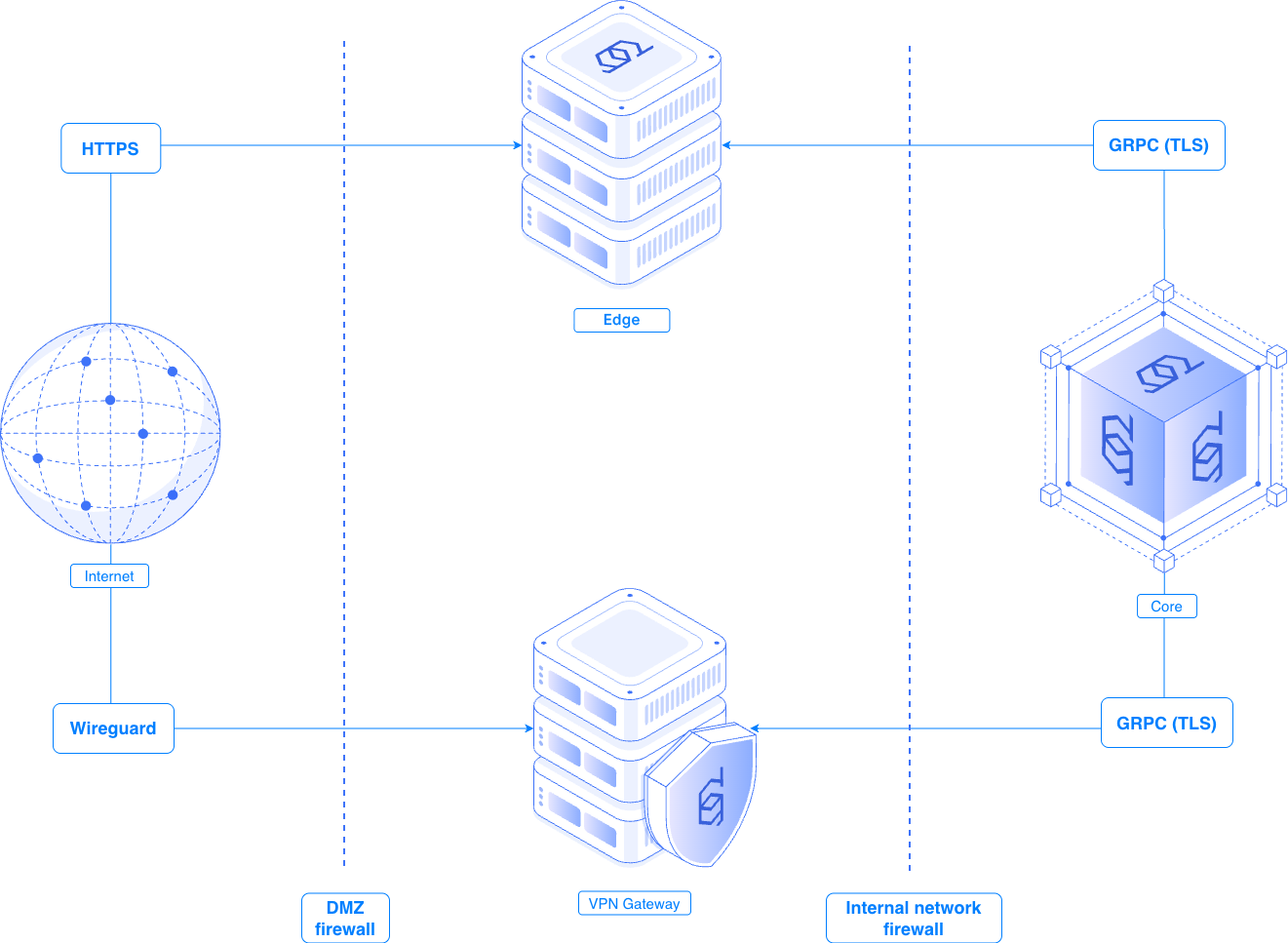
Strict division of responsibilities and network segmentation:
- Core — central management plane: identity, authentication, authorization, and policy
- Edge — public-facing entry point, exposes selected Defguard services GitHub repo
- Gateway — enforces network access policies for protected resources GitHub repo
For details refer to the architecture documentation.
Quick Start
The fastest way to evaluate Defguard is with the one-line installer:
bash <(curl -sSL https://raw.githubusercontent.com/defguard/deployment/main/docker-compose2.0/setup.sh)
⚠️ Warning! This installation method is intended for testing, demonstrations, and evaluation purposes only. It is not recommended for production deployments. See the deployment documentation for production deployment guidance, architecture recommendations, and high-availability configurations.
Documentation
Comprehensive documentation is available at: https://docs.defguard.net
Video guides
Visit out YouTube channel to see our [video guides](https://www.youtube.com/@defguard
Community
We want to get as much feedback as possible, so we encourage you to:
- 💬 open a GitHub discussion
- 🪲 report any missing features or bugs as issues
Contributions
Please review the Contributing guide for information on how to get started contributing to the project. You might also find our environment setup guide handy.
License
The code in this repository is available under a dual licensing model:
- Open Source License: The code, except for the contents of the "crates/defguard_core/src/enterprise" directory, is licensed under the AGPL license (see file LICENSE.md in this repository). This applies to the open core components of the software.
- Enterprise License: All code in this repository (including within the "crates/defguard_core/src/enterprise" directory) is licensed under a separate Enterprise License (see file crates/defguard_core/src/enterprise/LICENSE.md).
Legal
WireGuard® is registered trademarks of Jason A. Donenfeld.